Showing posts with label Stellent. Show all posts

Wednesday, June 24, 2009

How to move Vault and Weblayout Directories???

Most of the time you want the vault and weblayout folders to exist in a storage server (for example on SAN storage). You can do that during installation of UCM, where you will be asked for the location of the Vault and Weblayout directories, but if you forgot to do that, no problem you can change the location of the two directories.

In the following lines, I will tell you how to change the location of the two directories:

First I will suppose that we have a shared directory on the file server in which we will move the vault and weblayout directories, let us suppose the shared directory named "\\stellent-share\"

  1. Stop the content server
  2. Stop the webserver
  3. Move Vault and Weblayout directories to "\\stellent-share\"
  4. Edit the following configuration files
    /bin/intradoc.cfg
    /admin/bin/intradoc.cfg

    and add the following entries
    VaultDir=d:/vault/
    WeblayoutDir=d:/weblayout/
  5. In the currently used Web Server, change the location of the weblayout in the website settings

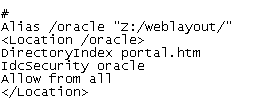
    Note: You need to create a mapped drive the new location of the weblayout directory (with win, use PUSHD command), which will be used with Web server settings

    If for example I mapped "//stellent-share/weblayout" to "Z:", in Apache the configurations will be
  6. Restart the web server
  7. Restart the content server
Don't forget you can do the

Sunday, June 21, 2009

UCM Workshop in Nigeria


I am late in posting this photo for attendees of Oracle UCM Workshop in Nigeria and me, that is because I received it from a week and I was busy. I'd like to thank Rasaq Hanafi for sending that photo, he is not in this photo, but he was one of the attendees and I think he is one of the most active attendees in the workshop.

Saturday, May 30, 2009

Site Studio 10gR4 tutorial

I am currently in the process of building Site Studio 10gR4 tutorial. I will try to help by giving you exact steps for building a complete website using most of Site Studio features. Actually I like the materials that I am using during my trainings for oracle partners which is based on Oracle University materials, and I will try to simulate them.

Tuesday, November 11, 2008

Integrating Universal Content Management with Active Directory

Here I will list steps for integrating Active Directory with Universal Content Management, then I will list troubleshooting tips for this integration. I wish it will be helpful for someone.

Integration Steps

1. Create organization unit in Active Directory named Stellent

2. Create a sub organization unit under Stellent named Roles

3. Under Roles create AD Security Groups with the same name as UCM Roles (like contributor, and admin)

4. In Content Server Home Page, open Admin Server page

5. Open Content Server instance that we will integrate on

6. Open Internet Configuration page

7. From Use Microsoft Security options choose Active Directory Security option

8. Restart Content Server for the current instance

9. In Content Server Home Page, under Administration tab open Filter Administration page

10. In front of Active Directory Security, click on Configure link

11. Under Role Prefix, add the following “OU=Roles,OU=Stellent[1]”

12. Click Update, at end of the Filter Administration page

13. Restart Content Server, and IIS (restart IIS from Servcies)

Troubleshooting Steps

If you faced any problem after the above steps, check the following

1. In IIS, open Direct Security, for Content Server website, then edit Authentication and access control, then ensure that Anonymous access and Integrated Windows authentication are enabled. After modification restart IIS

2. In Active Directory and Active Directory Configuration page (in Content Server Home Page) ensure that you didn’t misspell organization units names and AD security groups

3. In Active Directory Configuration page (in Content Server Home Page) ensure that you didn’t but spaces between words under Role Prefix

4. If you still face a problem restart IIS (from Services, not from Administration), and Content Server.

5. At last, if you still face a problem ensure you did the above steps well, and Restart Windows

Wednesday, November 5, 2008

Oracle WCM training

Last week I provided Oracle Web Content Management Training under Oracle university. It was the first one in the Middle East, and I am happy for that, and I think I did it well.

I wish I will provide all Oracle Content Management Courses, and I wil e able to improve ECM skills in Middle East

By The I didn't take any course in Oracle Content Management, where I depened on myself. I think self learning is very useful but most companies will wait and most people have not this skill.

Thursday, May 29, 2008

Inbound Refinery and Zip Renditons bug

I use ZipRenditionsManagement Component to add attachments functionality in content server, it was working fine but someday a customer reported a bug for me that attachments is not working. I don't like this kind of bugs, I searched for a solution to that bug but failed.

While I am tracing, I queried 'Revisions' table and I found the bug, tow document one takes attachment and the other one doesn't take, the difference between them was in the value of the field 'Rendition1' one took 'z' and the other took 't'. 't' means thumbnail and 'z' means zip renditions which means thumbnails and zip renditions can not work with each other. To turn off thumbnail, turn it off from inbound refinery.

Friday, February 8, 2008

IdcoScript vs Javascript

I'd like to explain the difference between IdocScript and Javascript because it is an important step for template pages in Oracle Content Server.

IdocScript is a server scripting language created for Oracle Content Server (formally Stellent Content Server) template pages. It consists of the basic functionality you need to create pages that display content or execute services. We should note IdocScript is designed only for the content server.

Javascript is a client side scripting language, that is executed by the client browsers. Javascript is used for form validations, and for making dynamic display of HTML elements. Javascript. Javascript cannot execute a service or retrieve results from the content server.

The idea is we use IdocScript for executing services and core functionality whether by standard functions, or by custom functions which are a java methods. Which means separating business logic. While Javascript is for the user interface, by Javascript we create functions for validating input data, and creating user friendly user interface. Which means separating user interface design from business logic.

<$i=1$>
<$loop tempResultSet$>
<tr>
<td><b><$i$></b></td>
<$i=i+1$>
<td><$col1$></td>
<td><$col2$></td>
<td>
<input type="button" value="click me" onClick="alert('<$col3$>');window.close()">
</td>
</tr>
<$endloop$>

Here in this code I have a result set called tempResultSet which consists of three columns (col1, col2, and col3), and I loop on this result set to display its values by just getting columns values <$col1$> and <$col2$>, but I need one more thing I need to have a button when it will be clicked, a pop up message with 'col3' value appear which is a Javascript functionality and cannot be done using IdocScript where Javascript can put event listener functions or code to HTML form elements like what we did above onClcik="alert('<$col3$>');", but in the alert method we need to display col3 value, so we just add IdocScript code that return col3 value.

How that thing is done, when I user requests the page contains that code, the request is passed to the web server, and the web server requests that page from the content server, the content server finds the template page which contains IdocScript code and Javascript code, in that point the content server executes the IdocScript code only which returns either HTML code or Javascript code, then the page is sent to the web server which will send it to the client with no Javascript code.

I think that explain gives you a complete picture about what happen, but I need to explain it more.

When The content server searches for the template page, it will find it like

<$i=1$>
<$loop tempResultSet$>
<tr>
<td><b><$i$></b></td>
<$i=i+1$>
<td><$col1$></td>
<td><$col2$></td>
<td>
<input type="button" value="click me" onClick="alert('<$col3$>');window.close()">
</td>
</tr>
<$endloop$>

Then the content server execute the IdocScript code before sending it the webserver, the above code will be changed to

<tr>
<td><b>1</b></td>
<td>value 1-1</td>
<td>value 1-2</td>
<td>
<input type="button" value=""click me onClick="alert('value 1-3');window.close()">
</td>
</tr>
<tr>
<td><b>2</b></td>
<td>value 2-1</td>
<td>value 2-2</td>
<td>
<input type="button" value="click me" onClick="alert('value 2-3');window.close()">
</td>
</tr>

and also the client will get the same result.

I wish this helps you in understanding the interaction and the isolation between IdocScript and Javascript.